Free BNN Kundli Software Download — Bhrigu Nandi Nadi Jyotish Complete Bhrigu Nandi Nadi (BNN) charts, bhava–planet combinations, Vimshottari dasha, transit and special transit — 100% free, fully offline, no sign-up.
A free desktop app for astrologers and students — download Setup or Portable below, whichever suits you. Every chart on one screen, with ready A4 PDF/PNG reports. Your data stays on your own computer.
When we build the BNN software for Mac, it will be added right here on this button — the Mac version is in the works.
 BNN Shakti 1.0Windows · offline · free
- Version
- 1.0.0stable release
- File size
- 109 MBSetup · 64-bit
- Operating system
- Windows 10 / 1164-bit (x64)
- Language
- Hindi + Englishswitch with one click
- Last updated
- 20 October 2026v1.0.0
A complete astrologer's desk — in one app
BNN Shakti runs the same calculations as the BNN chart on our website, but offline and without limits — as many charts and as many reports as you like.
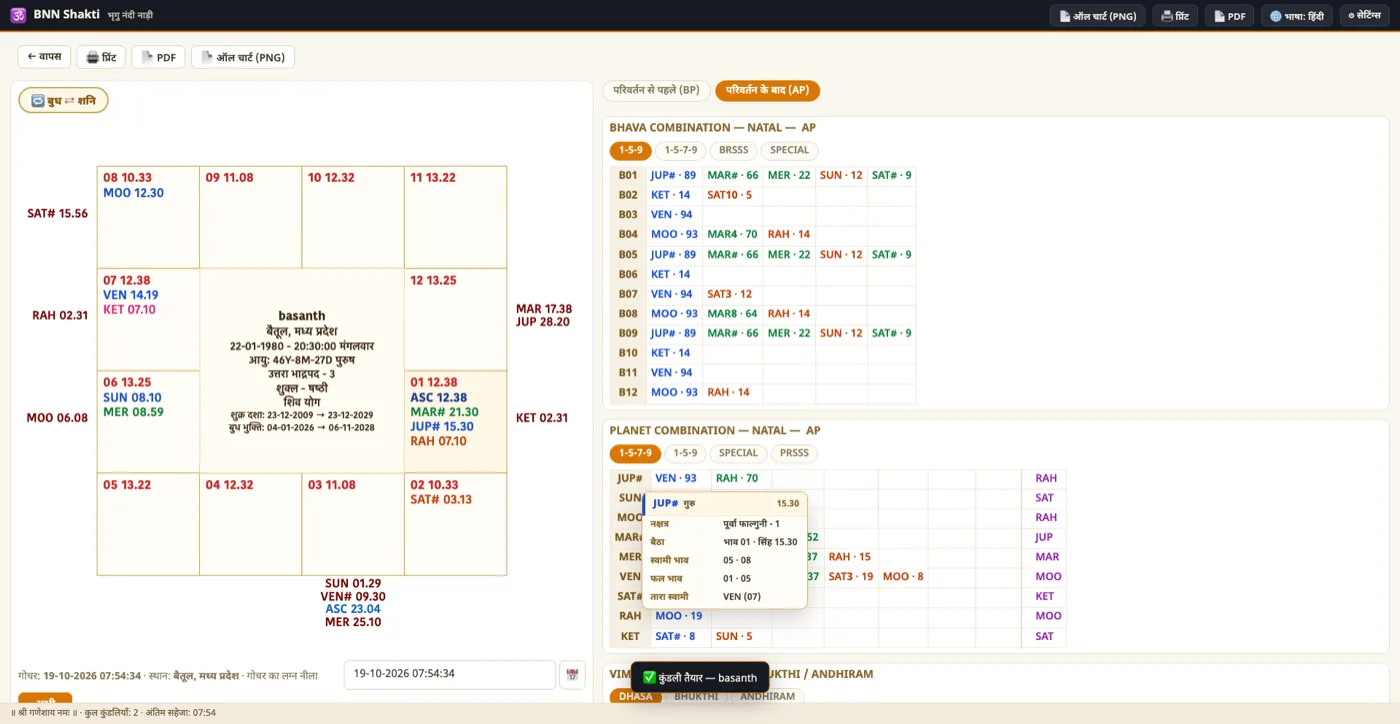
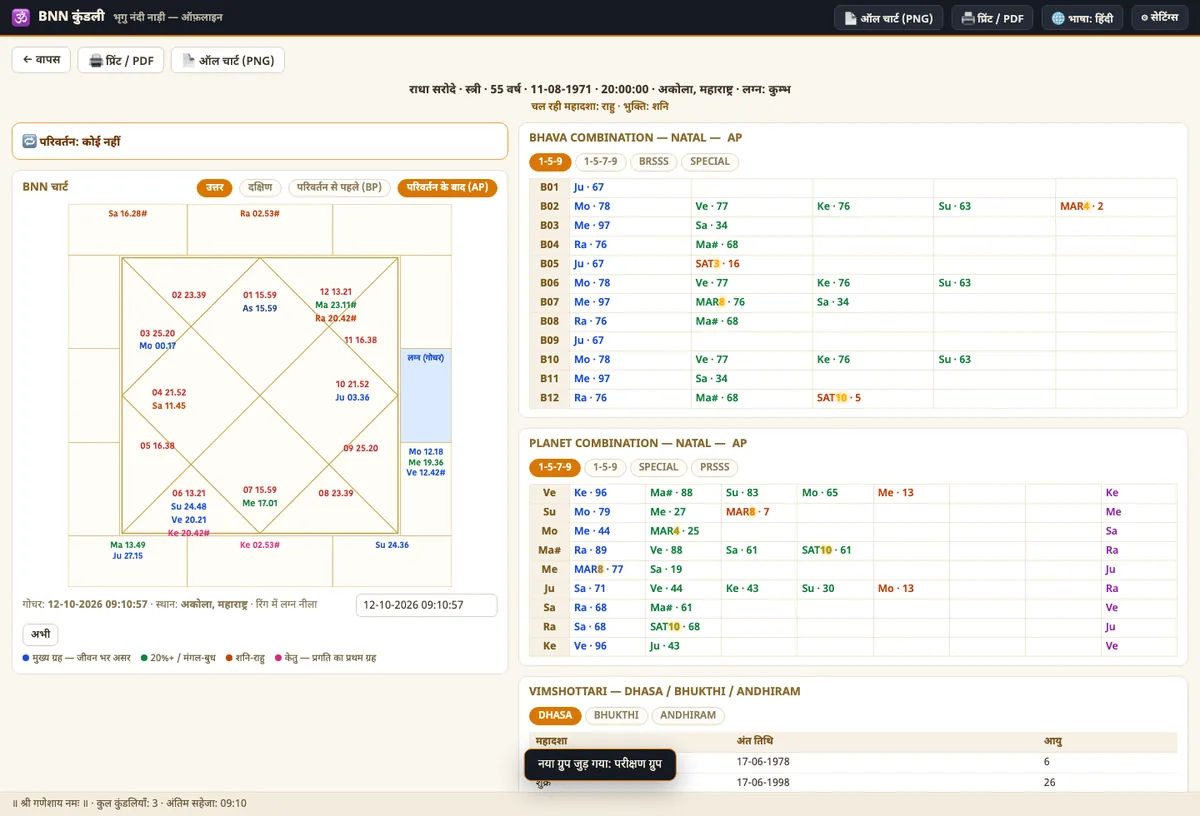
North + South Indian charts
Bhava numbers, ascendant, rashi and transit — both styles, side by side on one screen.
Bhava & planet combinations
BNN 1-5-9 / 1-5-7-9, BRSSS, SPECIAL and partner columns — in clean, colour-coded tables.
Vimshottari dasha–bhukti–antara
The running dasha and upcoming dates; click any dasha to drill down to bhukti and antara.
Transit + special transit
Transit for any date and time; Saturn–Jupiter and Rahu–Ketu chain tables with exact timings.
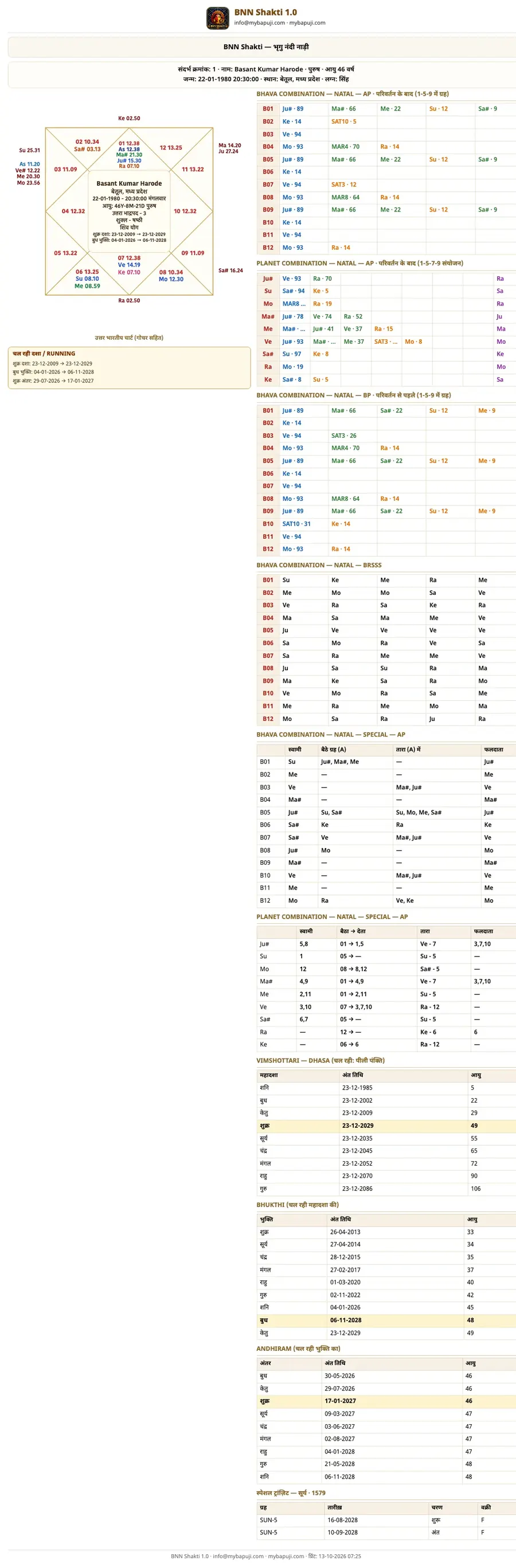
A4 PDF, print & PNG
The full analysis on one clean landscape sheet — ready to send to a client or keep on file.
6,482 cities, auto timezone
Search the birth place — timezone and daylight saving (DST) are applied automatically.
Chart library, groups & backup
Search by name or group, auto-save, and a one-file backup that opens on another computer too.
Hindi + English
Switch language from the top bar — screen, print and PNG all follow the same language.
Take a look inside
Nothing hidden — what you see here is exactly what you get after installing.
From download to your first chart — 4 steps, 2 minutes
- DownloadThere are two options above — Setup (installer, 109.2 MB) or Portable (no install, 108.9 MB). Whichever you click, the file starts downloading right away.
- Run itDouble-click the Setup file → Next → Install (1–2 minutes, a desktop icon is created). The Portable file opens with a double-click, no installation.
- Open it the first timeClick the icon. The app needs no internet, no login and no licence key.
- Make a chartEnter the birth date, time and place → see the chart, combinations, dasha and transit → save a PDF/PNG if you wish.
Verify the file — SHA-256
After downloading, compare the checksum (Windows: certutil -hashfile <file> SHA256). If they do not match, the file is incomplete — download it again.
Setup: aab126f7f27983be96a7c641ba1aac5e3c35576aa6587547d94c27148c511cb7
Portable: 2703241e68f010dc53e3e4025a8e7bd30db2190db70ac4355be2d07717095e52
System requirements
| Operating system | Windows 10 or Windows 11 (64-bit) |
|---|---|
| Processor | Intel / AMD 64-bit (x64) |
| Memory (RAM) | 2 GB minimum · 4 GB recommended |
| Disk | 300 MB free space |
| Screen | 1366 × 768 or larger |
| Internet | Only for the download — not needed afterwards |
| Extra software | None (no runtime or database) |
| Language | Hindi + English |
| Licence | Free — personal use (terms below) |
What's new in this version
1.0.0 — the first stable release, now publicly available.
Windows 10/11 (64-bit) · 109 MB · free
Download now- Planet hover details: hover any planet to see nakshatra-pada, bhava, lordship, fruits and star lord, with arrows drawn inside the chart.
- Special transit: a single chronological table with SUN–KET labels, dates and times (HH:MM).
- Instant transit: change any part of the date/time and the transit updates immediately — no button to press.
- New A4 PDF/print layout and a full “ALL CHART” PNG — good enough to send to a client.
- 6,482 cities with automatic timezone/daylight saving; data-folder and backup options in Settings.
- Hindi ⇄ English with one click — across the screen, print and PNG.
What is the Bhrigu Nandi Nadi (BNN) kundli software?
BNN Shakti 1.0 is the desktop edition of the BNN chart on our website. In Bhrigu Nandi Nadi jyotish the chart is read through the bhava-chalit (KP New) method — the houses are moved and the reading of planet combinations, dasha and transit is built on that. This software performs the same calculations on your own computer, with no internet and no limits.
What you get in this free BNN software
- North and South Indian charts with bhava numbers and ascendant
- BNN bhava combinations (1-5-9 / 1-5-7-9), planet combinations, BRSSS, SPECIAL and partner columns
- Vimshottari mahadasha · bhukti · antara with the running period and coming dates
- Transit for any date and time, plus Saturn–Jupiter and Rahu–Ketu special transit tables
- A4 landscape PDF, print and PNG reports, ready for a client or the family
Who it is for
Practising astrologers, students learning the BNN (Bhrigu Nandi Nadi) method, and anyone who wants to keep the family's charts organised. If you prefer working in a browser, our free online BNN chart is always there; this software is the offline, faster and more detailed version of the same engine.
Price and terms
The download is completely free — no subscription, no sign-up, no watermark. Free for personal and family use; please read the terms for commercial use below.
Download questions
The questions we get most — for anything else, write to us and we usually reply within 1–2 working days.
Is this software really free?
Yes. BNN Shakti 1.0 is completely free for personal and family use — no subscription, no trial period, no hidden charge. No sign-up is needed to download either.
Does it work without internet?
Completely. All calculations happen on your own computer — chart, dasha and transit work offline. The internet is only needed for the download and for new versions.
Windows showed “Windows protected your PC” — what should I do?
That appears when an app has no digital signature (code-signing certificate). Click More info → Run anyway. The app contains no ads, no tracking and no bundled software. You can also compare the SHA-256 given above.
The download is not starting / Drive says “quota exceeded”?
Sometimes Google Drive temporarily blocks a file when many people download it at once. Try again after an hour or two, or download from the Drive page directly — Setup file · Portable file. If it still fails, write to [email protected].
When will the Mac (macOS) version arrive?
The Mac version is being built now and will take some time. As soon as it is ready it will appear on this page, under the Mac button — it will be free as well.
Are my charts uploaded anywhere?
No. Everything is stored in your computer's user folder (%APPDATA%BNN-Kundli) — no server, no cloud, no account. To move to another computer, create a backup from Settings → Backup and open it there.
Can I use it commercially?
Personal and family use is free. Charging clients for charts or reports, selling the software, or distributing it under your own name is not allowed without written permission. For permission, write to [email protected].
What is the difference between Setup and Portable?
Setup installs the app and creates a desktop/Start-menu icon — best for everyday use. Portable runs without installation (even from a pen drive) — you just open the file each time.
Will my data survive an update?
Yes. The new file installs over the old one and uses the same data folder — charts, groups and settings stay. It is still good practice to keep a backup before a big update.
All four astrology tools are online and free
Alongside the software, use them in your browser — phone or computer, from anywhere. No installation, no sign-up.
Important notice, terms and disclaimer
1. Permission of use
BNN Shakti 1.0 is free for personal and family use. Without written permission the following are not allowed —
- Charging clients for charts or reports, or selling it as a service
- Selling, renting or bundling the software into another package
- Distributing copies under your own name or brand, or changing the “BNN Shakti” name and logo
- Extracting the code, data or chart engine for use in another product
2. Astrological information
Charts, dasha, transit and combinations are traditional astrological calculations, meant only for guidance and study. Do not treat them as a guarantee of the future or as final truth. For medical, legal, financial or other major decisions, consult a qualified professional. Any decision you take is your own responsibility.
3. Technical disclaimer
The software is provided “as is”. MyBapuji.com will not be liable for data loss, any effect on your computer, or any direct or indirect damage. Please keep regular backups of your chart data. The file is unsigned — a SmartScreen warning is normal; download only from this page and verify the SHA-256.
4. Copyright and contact
© 2026 MyBapuji.com — all rights reserved. The “BNN Shakti” name, logo and the software code are the property of MyBapuji.com. For commercial-use permission, collaboration or any question: [email protected]. This page will be updated whenever the terms change.